
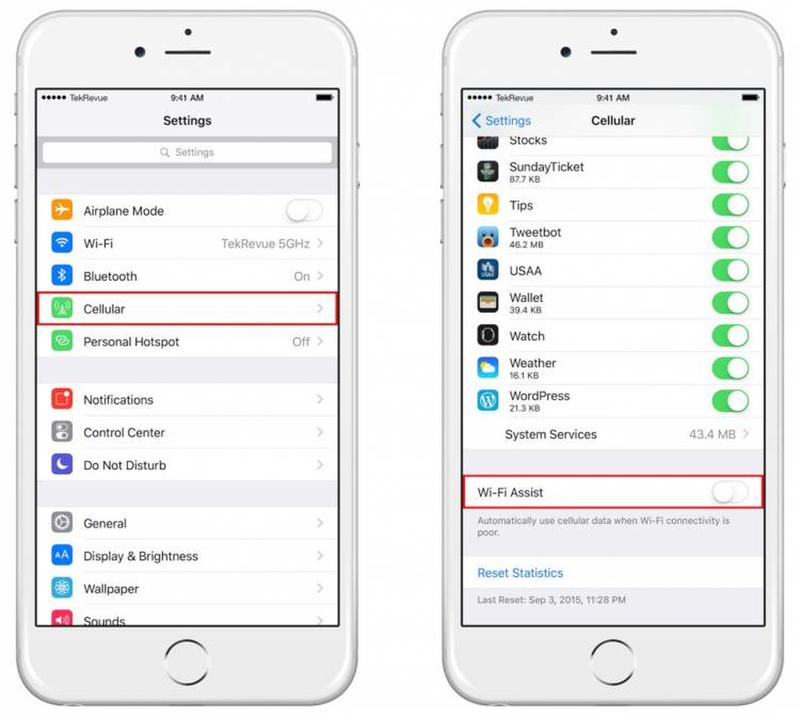
It's totally normal to look out for Wi-Fi connections when you're out in public. Not only is Wi-Fi generally faster than using data, it also saves you using up all of your own precious megabytes. What you don't want to do is waste time signing in to weak networks, only to realize you can't even use the internet properly on them. What's worse is that some of them make you go through a lengthy sign up process!
If you're in an area with patchy Wi-Fi connections, there's a way to filter them out so you can jump onto a good one, or simply keep using your data. The way to do this is by visiting Settings > Cellular and then switching 'Wi-Fi Assist' on. You'll never have to waste your time on a terrible connection again.
Over the years, weve seen so many food trends come and go, such as ramen burgers, matcha, and spiked ice-cream. Nowadays, were seeing another trend making waves in the food industry. How many times today have you seen an Instagram photo of a scoop of black ice cream, or a cup of black yogurt, or hamburgers with black buns? Indeed, the charcoal trend has taken the world by storm.
So, what gives your latte that deep black shade? Activated charcoal, or coconut ash, is produced by heating coconut shells to insanely high temperatures until theyre burnt to a crisp. The ashes are then increased in size by steaming at high temperatures. Through this process, the ashes become a strong detoxifier, mostly because they become extra absorbent. This product may be purchased in pill form, and promises to alleviate hangovers, minimize the effects of food poisoning, and fight the visible signs of aging.
Activated charcoal is said to boost ones energy as a result of decreasing toxins in the body. However, no evidence proves that detoxifying can lead to increased energy. Also, while it can help cure a hangover, it doesnt necessarily remove alcohol from your blood. It is also said to aid in debloating your stomach because it cleanses your colon but again, this all anecdotal and isnt supported by scientific evidence as of yet. All we can say for sure is that it is a proven detoxifier.